
Know your price, margin and GST before you sell.
A price that looks right can still leave you short once GST and the real margin are counted. Type a cost and the margin you want, and get the sell price straight away, with and without GST. It's built for New Zealand businesses that price products every day.
Available now for Android phones. Not available on iPhone.
See what you're really making
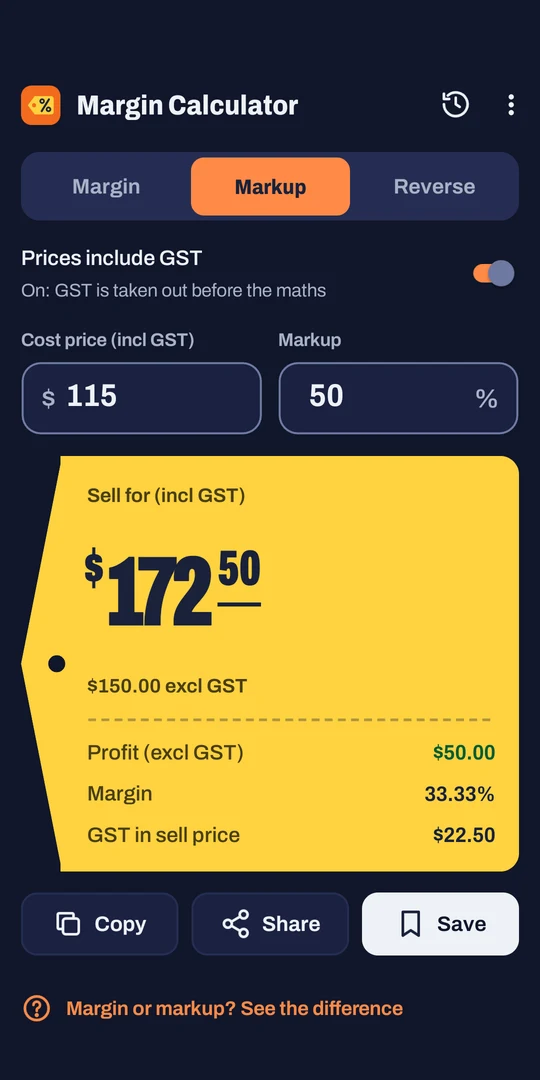
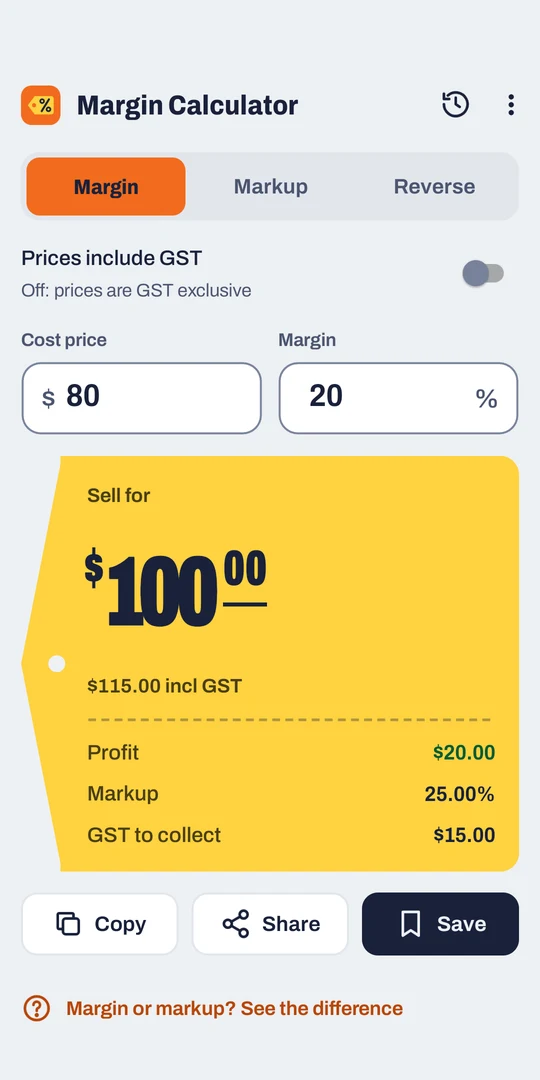
Margin and markup are not the same thing. Add 30% to your cost and you might think you're making 30%, when your margin is actually 23%. The app shows you both, so you always know which one you're looking at.
Start from whatever number you know
Pick a mode and type two numbers. The answer appears as you type.
Know the margin you want?
Enter your cost and target margin.
Price by adding a markup?
Enter your cost and markup.
Already have a sell price?
Enter cost and sell price to see what you're making and the break-even price.
Read the answer at a glance
Your result appears on a bright shelf ticket, so the number you need is the first thing you see.
- Big sell price, with the GST price below it
- Profit, margin and markup on every result
- GST to collect, worked out for you
- Copy the result or share it in one tap
Spot a loss before you make it
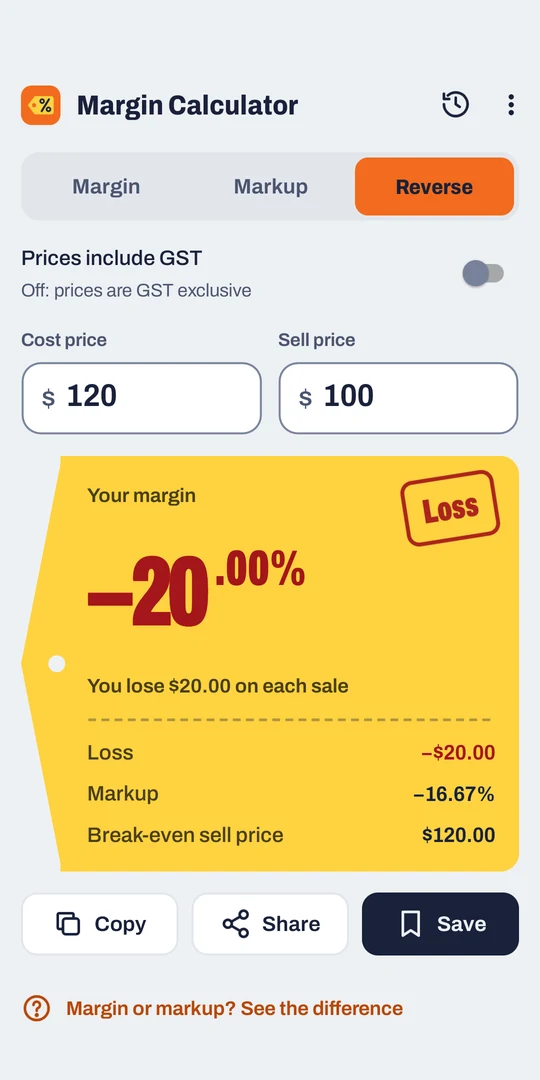
Selling below cost is easy to miss on a busy day. The app stamps it as a loss and tells you in plain words what it's costing you.
- A clear "Loss" stamp and a red figure, so it doesn't rely on colour alone
- "You lose $20.00 on each sale", in plain English
- The break-even sell price, so you know the lowest you can go
Get GST right, whether it's in or out
Supplier invoice includes GST? Flip one switch. GST comes off before the maths, so your margin is worked out on the real numbers.
- New Zealand GST at 15% is set up from the start
- Change the rate and name for other taxes, like VAT
- Light and dark themes
Find your prices again when you reorder
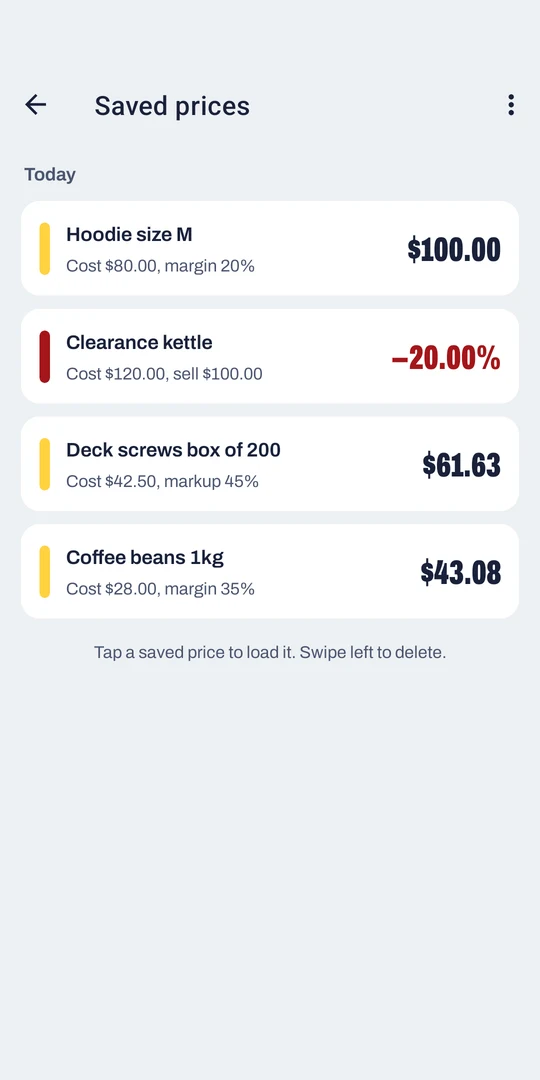
Save a result with the product name, and come back to it when you reorder or update your price list.
- Keep up to 50 saved prices, stored on your phone
- Grouped by day, with losses marked in red
- Tap to load a price again, swipe to delete
Anyone who sets a price
If you buy at one price and sell at another, it's built for you.
Retail and online stores
Price new stock quickly and check your margins hold when supplier costs go up.
Trades
Mark up materials on a quote while you're still on site, with GST worked out.
Food and hospitality
Set menu and product prices that cover ingredients and still leave a profit.
Makers and market stalls
Price handmade goods with confidence, from the workshop to the market table.
Free, with ads
Every mode and feature is free to use, with no sign-up or subscription. Your saved prices stay on your phone. The app has no purchases, so there's currently no paid way to remove ads.
When you'll see an ad
- A banner ad shows while you use the app, and hides while you type
- Full-screen ads are occasional: none in your first 2 minutes, at most one every 5 minutes and at most 3 in a session
- You won't see a full-screen ad straight after a calculation
Questions
What's the difference between margin and markup?
Both compare profit with a price. Margin is profit as a share of the sell price, and markup is profit as a share of the cost. Buy at $80 and sell at $100: you make $20, which is a 20% margin and a 25% markup. The app has a built-in explainer too.
Does it work with GST?
Yes. New Zealand GST at 15% is set up by default. Turn on "Prices include GST" when your costs include GST, and the app takes it out before doing the maths. Results show prices with and without GST.
Can I use it outside New Zealand?
Yes. In Settings you can change the tax rate and its name, for example to VAT at 20%. Amounts still show with a $ sign.
Is it available on iPhone?
No. Margin Calculator is for Android phones running Android 7.0 or later.
Does it need an internet connection?
The calculations and your saved prices work with no connection, because both are on your phone. Ads need a connection to load.
Can I remove the ads?
Not at the moment. The app is free and has no purchases. Our privacy policy explains what the ads collect and your choices.
Get Friendly Margin Calculator free on Google Play.
Know your margin, your markup and your GST before you put a price on it. Free, with ads.

- Android 7.0 and later
- Privacy policy
- Support: admin@friendlyit.co.nz
Google Play and the Google Play logo are trademarks of Google LLC. Android is a trademark of Google LLC.